class 3, sep. 29 🏃
agenda 📜
last week was a code week, now it’s a type week!
- 1👾 share your ascii sites!
- 2🏃 variable pixel fonts
- 3⭕️ variable component fonts
- 4✍️ due next class
share your ascii sites! 👾
here’s the plan ✅
- 1i’ll need a few volunteers to share their computers.
- 2line your computers up in row on the table.
- 3everyone navigate to the spreadsheet↗.
- 4we’ll then go through the websites together.
is this a crit? 🤔
sort of? not really. this is more of a show and tell.
tell us:
- →what did you make and why?
- →how did you make it?
and we’ll say:
- →what do we find most exciting about it?
- →what other possibilities can we imagine?
variable pixel fonts 🏃
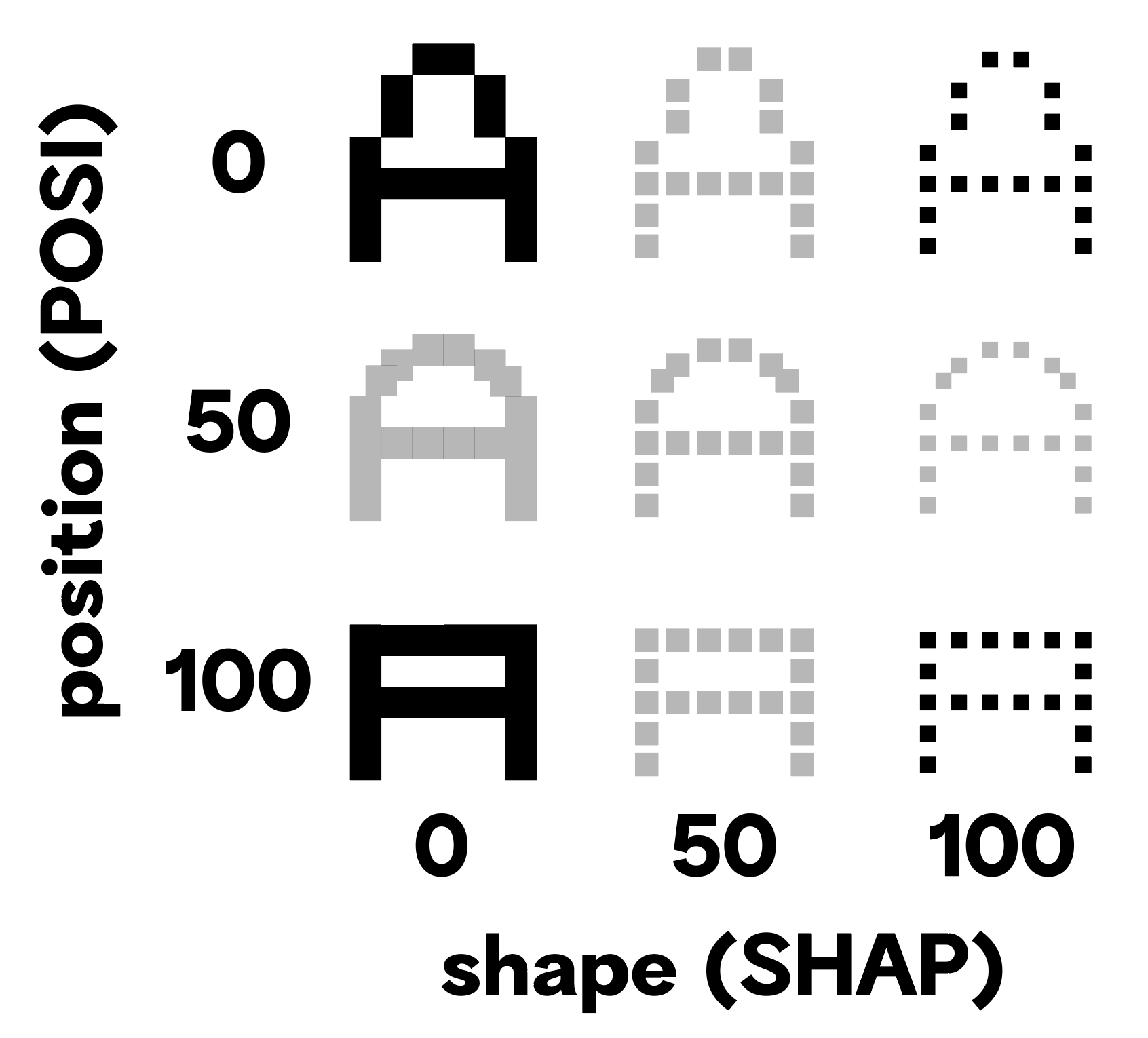
let’s learn how to turn a static font into a variable font. we’ll do this by drawing pixel self-portraits and then bringing them to life.
step 1
create a new pixel font. set up the pixel grid and draw a self-portrait in the uppercase letter A
step 2
add two variable axes to your font:
- 1Position
POSI - 2Shape
SHAP
step 3
duplicate your first font master to add two additional font masters to your font and assign the following names/values to each font master:
- 1Normal,
POSI=0, SHAP=0 - 2New Position,
POSI=100, SHAP=0 - 3New Shape,
POSI=0, SHAP=100
step 4
set your pixel grid back to 1.
now, we edit each font master!
- 1Normal → the default drawing
- 2New Position → change the pixel shape
- 3New Shape → move the pixels around
step 5
make one more font master by duplicating the New Position,POSI=100, SHAP=0 font master.
name this new font master New Shape and Position, POSI=100, SHAP=100
change the pixel shape in this font master to match the shape on the New Shape, POSI=0, SHAP=100 font master.
step 6
export your font as a variable font file and test it at font gauntlet↗!
in the end, we should have something like this:
variable component fonts ⭕️
this is an exercise/tutorial. we’re going to learn how to make component fonts by working with each other.
- 1we’ll design a few components.
- 2we’ll trade font files and draw illustrations in the ABCDE glyphs using the pre-made components.
- 3we’ll trade our fonts again and add a variable axis and modify the component shapes.
- 4we’ll keep trading our fonts, adding a new font master and a new component shape each time.
due next class ✍️
your fonts for p2! let’s look at the project description.